

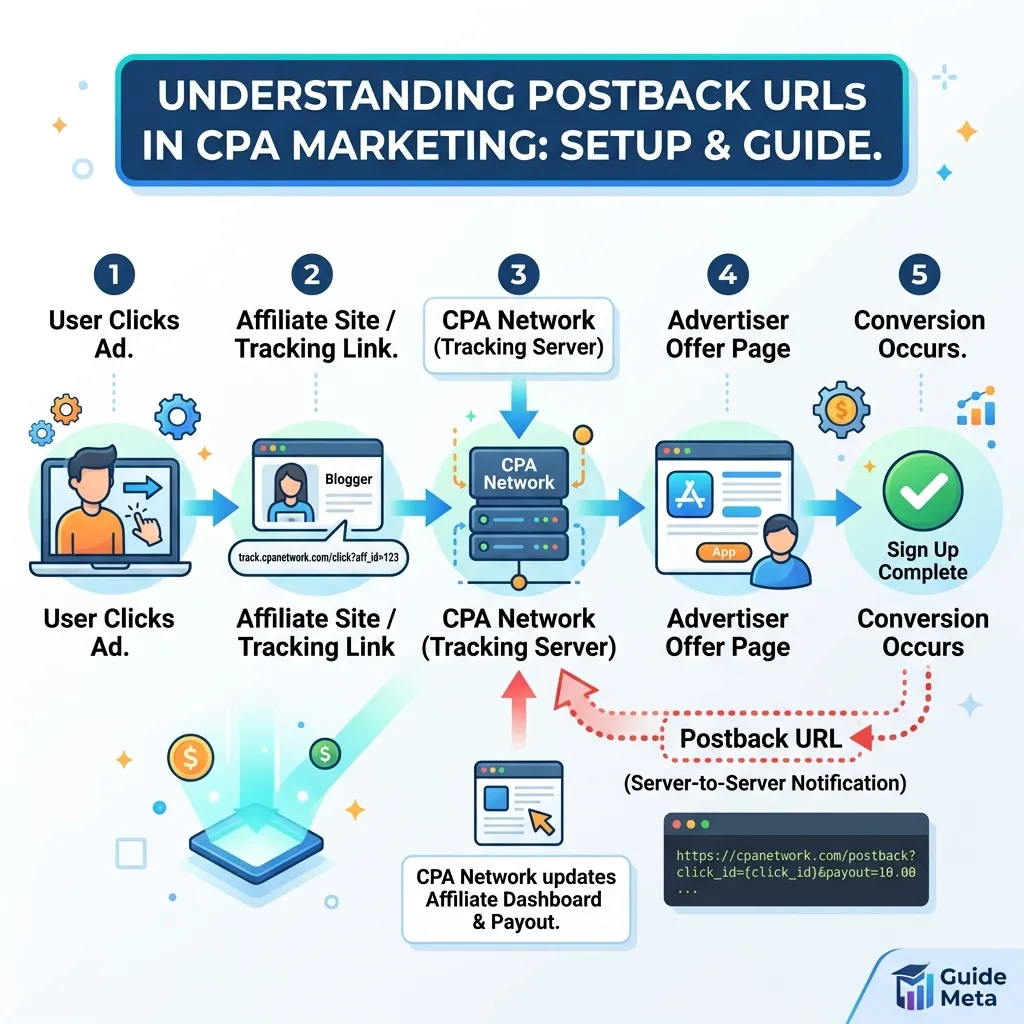
A postback URL is a server-to-server link that lets a CPA network notify your tracking platform the moment a conversion happens — no cookies, no browser, no risk of ad blockers eating your data. This guide breaks down exactly what it is, how the request travels from network to tracker, why it beats pixel-based tracking for affiliate work, and how to set one up correctly. By the end, you’ll understand every parameter involved and know how to troubleshoot the most common setup mistakes.
What Is a Postback URL?
A postback URL is a specific web address that a CPA network calls automatically whenever a user completes a tracked action, such as a signup, lead form, or purchase. Instead of relying on a script running in the user’s browser, the request fires directly from the network’s server to your tracker’s server. This is why the method is often called server-to-server (S2S) tracking.
In practical terms, it acts like a messenger. When someone clicks your affiliate link and later converts on the advertiser’s page, the CPA network sends a quiet background signal — the postback — carrying details about that conversion straight to wherever you’ve told it to go.
Why Postback URLs Matter in CPA Marketing
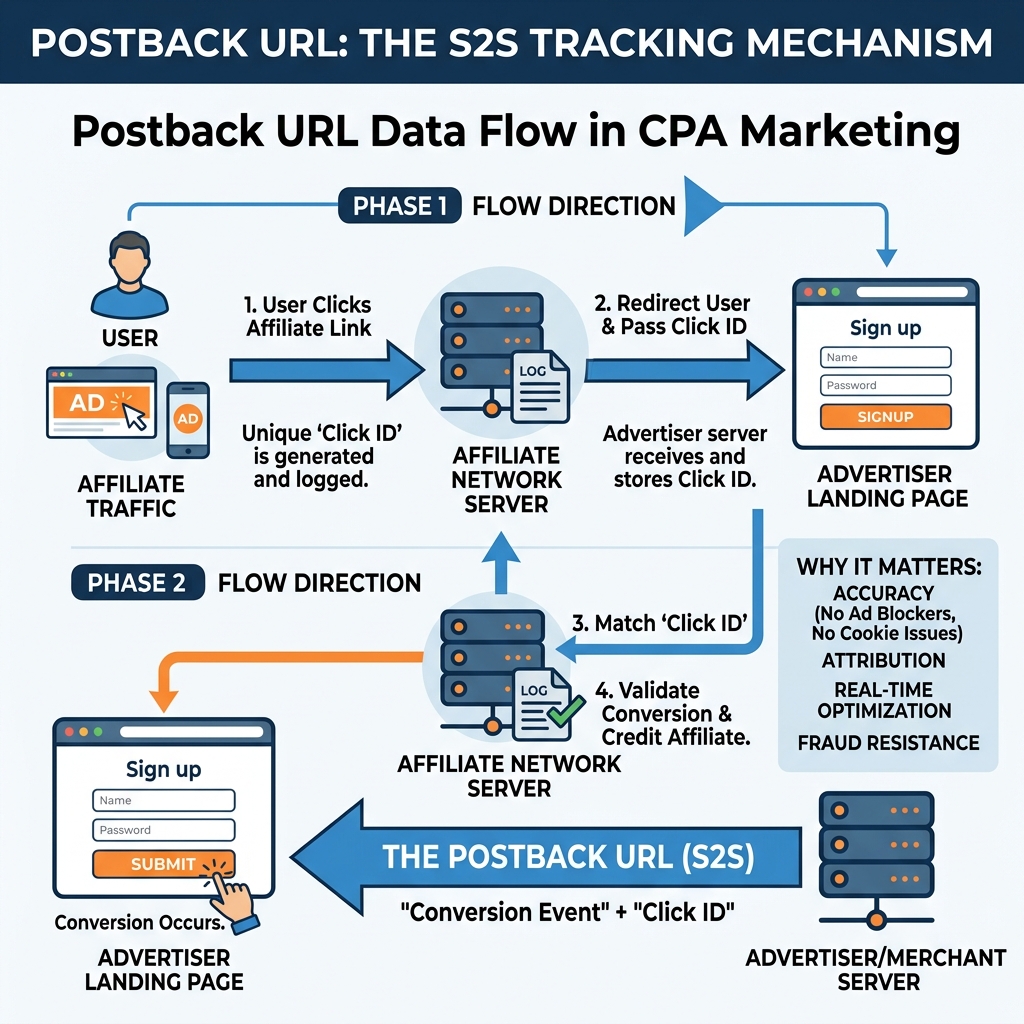
Cost-per-action campaigns live and die by accurate data. If you can’t tell which clicks turned into conversions, you can’t optimize spend, cut losing traffic sources, or scale winning ones. This tracking method solves that problem in a way that older tracking pixels simply can’t match anymore.
Here’s why this tracking method has become the standard in modern CPA marketing:
- It bypasses ad blockers. Since the request happens server-to-server rather than in a visitor’s browser, it isn’t affected by browser extensions or privacy tools that block scripts.
- It survives cookie restrictions. Safari’s Intelligent Tracking Prevention and similar browser policies have made cookie-based pixels unreliable, but this method doesn’t depend on cookies at all.
- It works across devices. Because tracking happens on the backend, it can maintain accurate attribution even when a user switches from mobile to desktop mid-journey.
- It’s harder to manipulate. Server-side calls are much more difficult to spoof than client-side pixels, giving both advertisers and affiliates more confidence in the reported numbers.
Without reliable postback tracking, CPA marketers are essentially flying blind, guessing which traffic sources actually deliver value instead of knowing for certain.
How a Postback URL Works, Step by Step
Understanding the full lifecycle of a postback request makes troubleshooting far easier later on. Here’s the typical sequence:
- A user clicks your affiliate link. Your tracking platform generates a unique click identifier, often called a click ID or sub ID, and appends it to the URL sent to the offer page.
- The click ID travels with the user. As the visitor moves through the advertiser’s funnel, the click ID stays attached, usually as a hidden parameter or passed along by the offer page itself.
- The user completes the target action. This could be filling out a form, signing up for a trial, or making a purchase — whatever the CPA offer defines as a conversion.
- The network fires the postback URL. The CPA network’s server sends an HTTP request to the address you configured, including the original click ID and other relevant data like payout amount or conversion type.
- Your tracker records the conversion. Once your tracking platform receives the call, it matches the click ID back to the original click and logs the conversion against the correct campaign, traffic source, and creative.
This entire exchange typically happens within seconds, which is why marketers describe this kind of tracking as real-time.
If you want a deeper technical walkthrough of connecting these pieces together, our complete CPA conversion tracking guide covers the setup process across multiple tracker platforms.
Postback URL vs. Tracking Pixels
Many beginners confuse a postback URL with a tracking pixel, but the two work very differently. A tracking pixel is a small snippet of code placed directly on a “thank you” or confirmation page. When that page loads in the user’s browser, the pixel fires and reports the conversion — but only if the browser allows it, cookies are intact, and no ad blocker interferes.
This method skips the browser entirely. The CPA network’s own server sends the conversion data directly to your tracker’s server, which is why it’s immune to the browser-side restrictions that increasingly break pixel tracking. In affiliate marketing specifically, pixels are also often impossible to use at all, since affiliates don’t own the offer page and can’t install code on it. This server-side approach solves the ownership problem by having the network — not the affiliate — trigger the notification.
Key Parameters in a Postback URL
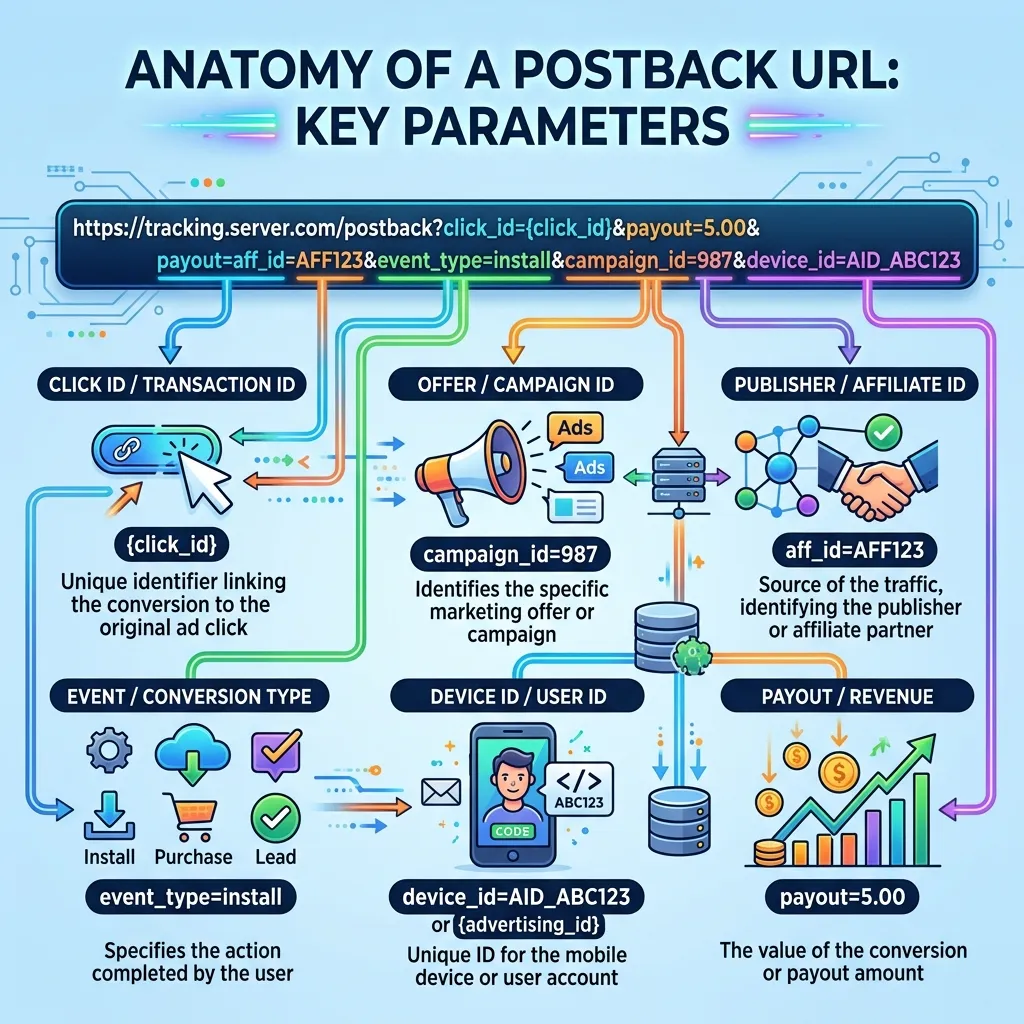
A typical postback link includes several dynamic parameters, usually represented as macros that get automatically filled in with real data when the request fires. Common parameters include:
- Click ID — the unique identifier tying the conversion back to the original click
- Payout or Revenue — the commission or value associated with the conversion
- Offer ID — which specific offer generated the conversion
- Conversion Status — whether the action was approved, pending, or rejected
- Sub IDs — additional custom parameters used for deeper segmentation, such as ad placement or creative variant
A properly formatted example might look something like this:
https://yourtracker.com/postback?click_id={click_id}&payout={payout}&offer_id={offer_id}
The exact macro syntax varies by network and tracker, so it’s worth double-checking documentation before going live with a new one.
How to Set Up a Postback URL
Setting up this tracking link correctly takes a bit of care, but the process follows a consistent pattern across most trackers and networks:
- Generate the link in your tracker. Most tracking platforms provide a unique postback template you’ll copy into the CPA network’s settings.
- Insert your tracker’s macros. Replace placeholder values with the correct macro syntax your tracker expects for click ID, payout, and any custom parameters.
- Add it to the network. Log into your CPA network account and paste the generated URL into the appropriate tracking or integration settings for each offer.
- Test with a sample conversion. Most networks offer a way to simulate a conversion so you can confirm it’s firing correctly before real traffic runs.
- Verify data in your tracker. Check that the test conversion appears with the correct click ID, payout, and offer details attached.
- Launch your campaign. Once verified, it will fire automatically on every real conversion going forward.
Getting this setup wrong is one of the most common reasons CPA campaigns underperform, since bad data leads directly to bad optimization decisions. Our guide on avoiding common CPA marketing mistakes covers several postback-related pitfalls in more detail.
Common Postback URL Mistakes to Avoid
Even experienced marketers run into setup issues from time to time. Watch out for these frequent problems:
- Mismatched macros — using a macro format the network doesn’t recognize, causing the click ID to arrive blank or malformed.
- Wrong URL placement — pasting the link into the wrong field within the network’s dashboard, so it never fires at all.
- Duplicate conversions — failing to add deduplication logic, which can cause the same conversion to be counted multiple times.
- Missing test conversions — skipping the test step and only discovering a broken setup after real ad spend has already gone out.
- Ignoring conversion status — treating every call as an approved conversion, even when the network reports it as pending or rejected.
Catching these issues early can save significant wasted ad spend, especially when scaling a campaign quickly.
Postback URL Best Practices for CPA Marketers

Beyond basic setup, a few habits separate marketers who get clean, trustworthy data from those constantly troubleshooting broken numbers:
- Always test before scaling. Never push meaningful budget toward a campaign until you’ve confirmed the setup is firing and recording correctly.
- Use unique sub IDs. Passing additional parameters through this link lets you break down performance by ad creative, placement, or audience segment.
- Monitor for gaps. Periodically compare conversion counts reported by the network against what your tracker shows through this channel, and investigate any mismatches immediately.
- Keep documentation handy. Networks occasionally change their macro syntax, so keeping a reference of each network’s exact URL format saves time during future setups.
- Build your strategy around clean data. A properly firing postback URL is the foundation for any data-driven optimization approach, which our guide to data-driven CPA campaign strategies explores further.
For a deeper technical reference on how server-to-server tracking compares to other conversion tracking methods, RedTrack’s postback tracking guide offers useful additional context.
Conclusion
A postback URL is one of the most important pieces of infrastructure in modern CPA marketing, quietly connecting networks and trackers so every conversion gets recorded accurately, in real time, without relying on fragile browser-based tracking. Once you understand how the click ID travels through the funnel and how the network calls your setup on conversion, the process becomes far less intimidating. Take the time to test thoroughly, document each network’s macro format, and monitor for discrepancies — the accuracy of your entire optimization strategy depends on it. Get your configuration right, and every other decision in your CPA campaigns gets easier from there.
Frequently Asked Questions
1. What exactly is a postback URL?
A postback URL is a server-to-server link that a CPA network automatically calls whenever a conversion occurs. It sends conversion data directly to your tracking platform without relying on the visitor’s browser.
2. How is a postback URL different from a pixel?
A pixel fires in the user’s browser and depends on cookies, JavaScript, and browser permissions. A postback URL works server-to-server, making conversion tracking more reliable and less affected by browser restrictions.
3. Do I need a postback URL for every CPA offer?
Yes, ideally. Setting up a separate postback URL for each CPA offer helps ensure conversions are tracked accurately and attributed to the correct campaign, traffic source, and click.
4. Can a postback URL be blocked by ad blockers?
Generally, no. Because the request happens directly between servers, postback tracking is not dependent on browser scripts or cookies and is much less affected by ad blockers and browser privacy restrictions.
5. What is a click ID and why does it matter for a postback URL?
A click ID is a unique identifier created when someone clicks your tracking link. It allows the tracker to connect a conversion with the original click, campaign, traffic source, and other relevant tracking data.
6. Why isn’t my postback URL firing?
Common causes include incorrect macro syntax, a missing click ID, an incorrectly configured URL, or placing the postback in the wrong field. The CPA network and tracker must also use compatible parameters for the conversion to be recorded.
7. Can I use the same postback URL across multiple networks?
Generally, no. Each CPA network may use different macros, parameters, and tracking requirements. You should configure the postback according to the specific network and tracker you’re using.
8. Is postback URL tracking the same as S2S tracking?
Yes. Postback tracking is commonly referred to as server-to-server (S2S) tracking because conversion information is transferred directly between the CPA network’s server and your tracking platform.
9. How do I test a new postback URL before launching a campaign?
Most CPA networks provide a test conversion or testing option. You can trigger a sample conversion and check whether the click ID, conversion value, status, and other parameters appear correctly in your tracker.
10. What happens if a conversion is later rejected?
A properly configured postback URL can pass a conversion status or related information back to the tracker. This allows approved, pending, and rejected conversions to be handled more accurately in campaign reports.
11. Can affiliates use a postback URL if they don’t own the offer page?
Yes. This is one of the main benefits of postback tracking. The conversion notification comes directly from the CPA network’s server, so affiliates don’t need to add tracking code to a landing page or offer page they don’t control.
12. What tools require a postback URL to work properly?
Affiliate trackers such as Voluum, RedTrack, and Binom commonly support postback tracking. Accurate conversion data can also help automated bidding, optimization, and CPA-based campaign management work more effectively.


Leave a Reply